
Mobile Computing Course (3 Credits)
1. Introduction to Mobile Networks
2. Types - MANET, WSN, VANET, PAN, DTN, Cellular
3. Reference Models for Network communication
A Good start to the topic of our discussion - Mobile Computing.
Ask yourself: Q1. What will computers look like in ten years? Q2. How will users network with the help of these next-gen computers?
So take a step back, a computer exhibits one of the following characteristics:
● Fixed and wired: It describes the typical desktop computer in an office. Neither weight nor power consumption of the devices allow for mobile usage. The devices use fixed networks for performance reasons.
● Mobile and wired: Many of today’s laptops fall into this category; users carry the laptop from one hostel to the next, reconnecting to the company’s network via the telephone network and a modem.
● Fixed and wireless: This mode is used for installing networks, e.g., in historical buildings to avoid damage by installing wires, or at trade shows to ensure fast network setup. Another example is bridging the last mile to a customer by a new operator that has no wired infrastructure and does not want to lease lines from a competitor.
● Mobile and wireless: No cable restricts the user, who can roam between different wireless networks. A successful example is GSM with more than 800 million users.
So two properties pop up in this discussion, User mobility and Device portability:
- User mobility refers to a user who has access to the same or similar telecommunication services at different places, i.e., the user can be mobile, and the services will follow him or her. Eg: Simple call-forwarding solutions known from the telephone or computer desktops supporting roaming (i.e., the desktop looks the same no matter which computer a user uses to log into the network).
- Device portability, the communication device moves (with or without a user). Many mechanisms in the network and inside the device have to make sure that communication is still possible while the device is moving. Eg: Mobile phone system, where the system itself hands the device from one radio transmitter (also called a base station) to the next if the signal becomes too weak.
We already know that ‘Wireless’ is a way of accessing a network or other communication partners, i.e., without a wire. The wire is replaced by the transmission of electromagnetic waves through ‘the air’ (although wireless transmission does not need any medium).
 mobile communications road traffic
1.1 Some applications of wireless communication
1.1.1 Vehicles
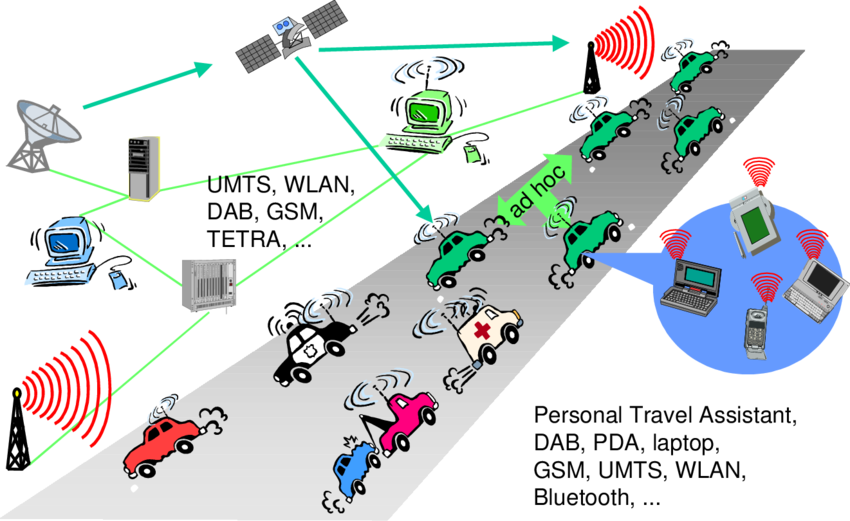
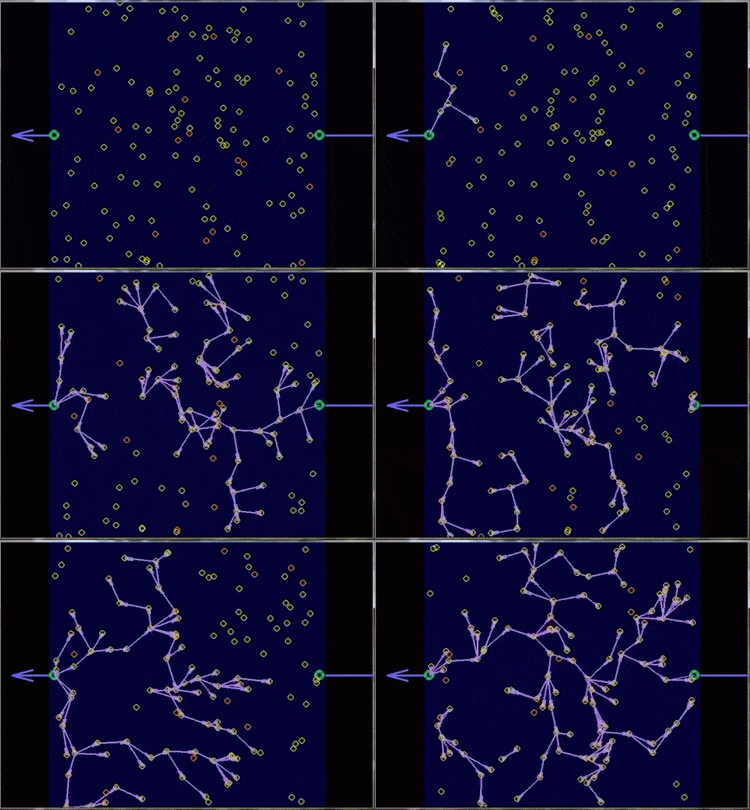
Music, news, road conditions, weather reports, and other broadcast information are received via digital audio broadcasting (DAB) with 1.5 Mbit/s. For personal communication, a universal mobile telecommunications system (UMTS) phone might be available offering voice and data connectivity with 384 kbit/s. For remote areas, satellite communication can be used, while the current position of the car is determined via the global positioning system (GPS). Cars driving in the same area build a local ad-hoc network for the fast exchange of information in emergency situations. In case of an accident, not only will the airbag be triggered, but the police and ambulance service will be informed via an emergency call to a service provider. In the future, cars will also inform other cars about accidents via the ad-hoc network to help them slow down in time, even before a driver can recognize an accident. Buses, trucks, and trains are already transmitting maintenance and logistic information to their home base, which helps to improve organization (fleet management), and saves time and money. Networks with a fixed infrastructure like cellular phones (GSM, UMTS) will be interconnected with trunked radio systems (TETRA) and wireless LANs (WLAN). Satellite communication links can also be used. The networks between cars and inside each car will more likely work in an ad-hoc fashion. Wireless pico networks inside a car can comprise personal digital assistants, laptops, or mobile phones. Connected with each other using Bluetooth technology. Think of similar scenarios for air traffic or railroad traffic. Different problems can occur here due to speed. While aircraft typically travel at up to 900 km/h and current trains up to 350 km/h, many technologies cannot operate if the relative speed of a mobile device exceeds, e.g., 250 km/h for GSM or 100 km/h for AMPS. Only some technologies, like DAB work up to 900 km/h (unidirectional only).
 adhoc network
1.1.2 Emergencies
Imagine the possibilities of an ambulance with a high-quality wireless connection to a hospital. Vital information about injured persons can be sent to the hospital from the scene of the accident. All the necessary steps for this particular type of accident can be prepared and specialists can be consulted for an early diagnosis. Wireless networks are the only means of communication in the case of natural disasters such as hurricanes or earthquakes. In the worst cases, only decentralized, wireless ad-hoc networks survive. Because the breakdown of all cabling not only implies the failure of the standard wired telephone system, but also the crash of all mobile phone systems requiring base stations!
1.1.3 Business
A travelling salesman today needs instant access to the company’s database: to ensure that files on his or her laptop reflect the current situation, to enable the company to keep track of all activities of their travelling employees, to keep databases consistent etc. With wireless access, the laptop can be turned into a true mobile office, but efficient and powerful synchronization mechanisms are needed to ensure data consistency. When employees try to communicate off base. At home, the laptop connects via a WLAN or LAN and DSL to the Internet. Leaving home requires a handover to another technology, e.g., to an enhanced version of GSM, as soon as the WLAN coverage ends. Due to interference and other factors, data rates drop while cruising at higher speed.
1.1.4 Replacement of wired networks
Wireless networks can replace wired networks, e.g., remote sensors, for tradeshows, or in historic buildings. Due to economic reasons, it is often impossible to wire remote sensors for weather forecasts, earthquake detection, or to provide environmental information. Wireless connections, e.g., via satellite, can help in this situation. Tradeshows need a highly dynamic infrastructure, but cabling takes a long time and frequently proves to be too inflexible. Many computer fairs use WLANs as a replacement for cabling. Other cases for wireless networks are computers, sensors, or information displays in historical buildings, where excess cabling may destroy valuable walls or floors. Wireless access points in a corner of the room can represent a solution.
1.1.5 Infotainment and more
Internet everywhere? Not without wireless networks! Imagine a travel guide for a city. Static information might be loaded via CD-ROM, DVD, or even at home via the Internet. But wireless networks can provide up-to-date information at any appropriate location. The travel guide might tell you something about the history of a building (knowing via GPS, contact to a local base station, or triangulation where you are) downloading information about a concert in the building at the same evening via a local wireless network. You may choose a seat, pay via electronic cash, and send this information to a service provider. Another growing field of wireless network applications lies in entertainment and games to enable, e.g., ad-hoc gaming networks as soon as people meet to play together.
1.1.6 Location dependent services
Many research in mobile computing and wireless networks try to hide that a wireless link is more error prone than a wired one. Mobile IP tries to hide the fact of changing access points by redirecting packets but keeping the same IP address, and many protocols try to improve link quality using encoding mechanisms or retransmission so that applications made for fixed networks still work.
Several services that might depend on the actual location can be distinguished:
● Follow-on services: Using mobile computers, a follow-on service could offer the same desktop environment wherever you are in the world. All email would automatically be forwarded and all changes to your desktop and documents would be stored at a central location at your company. If someone wanted to reach you using a multimedia conferencing system, this call would be forwarded to your current location.
● Location aware services: Imagine you wanted to print a document sitting in the lobby of a hotel using your laptop. If you drop the document over the printer icon, where would you expect the document to be printed? Certainly not by the printer in your office! For instance, there could be a service in the hostel announcing that a standard laser printer is available in the lobby or a color printer in a hotel meeting room. Your computer might then transmit your personal profile to your hostel which then charges you with the printing costs.
● Privacy: The two service classes listed above immediately raise the question of privacy. You might not want video calls following you to dinner, but maybe you would want important emails to be forwarded. There might be locations and/or times when you want to exclude certain services from reaching you and you do not want to be disturbed. You want to utilize location dependent services, but you might not want the environment to know exactly who you are. Imagine a hostel monitoring all students and selling these profiles to companies for advertisements.
● Information services: A service could also actively ‘push’ information on your travel guide, e.g., the Mexican restaurant just around the corner has a special taco offer. ● Support services: Intermediate results of calculations, state information, or cache contents could ‘follow’ the mobile node through the fixed network. As soon as the mobile node reconnects, all information is available again. This helps to reduce access delay and traffic within the fixed network. Caching of data on the mobile device (standard for all desktop systems) is often not possible due to limited memory capacity. The alternative would be a central location for user information and a user accessing this information through the (possibly large and congested) network all the time as it is often done today.
1.1.7 Mobile and wireless devices
There is no precise classification of such devices, by size, shape, weight, or computing power. Currently, laptops are considered the upper end of the mobile device range.
Some examples of mobile and wireless devices graded by increasing performance (CPU, memory, display, input devices):
● Sensor: A very simple wireless device is represented by a sensor transmitting state information. Eg: A switch sensing the office door. If the door is closed, the switch transmits this to the mobile phone inside the office which will not accept incoming calls. Without user interaction, the semantics of a closed door is applied to phone calls.
● Embedded controllers: Many appliances already contain a simple or sometimes more complex controller. Keyboards, mice, headsets, washing machines, coffee machines, hair dryers and TV sets are just some examples. Why not have the hair dryer as a simple mobile and wireless device (from a communication point of view) that is able to communicate with the mobile phone? Then the dryer would switch off as soon as the phone starts ringing – that would be a nice application!
● Pager: As a very simple receiver, a pager can only display short text messages, has a tiny display, and cannot send any messages.
● Mobile phones: Mobile phones with full color graphic display, touch screen, and Internet browser are easily available.
● Personal digital assistant: PDAs typically accompany a user and offer simple versions of office software (calendar, note-pad, mail). The typical input device is a pen, with built-in character recognition translating handwriting into characters. Web browsers and many other software packages are available for these devices.
● Pocket computer: The next steps toward full computers are pocket computers offering tiny keyboards, color displays, and simple versions of programs found on desktop computers (text processing, spreadsheets etc.).
● Notebook/laptop: Finally, laptops offer more or less the same performance as standard desktop computers; they use the same software – the only technical difference being size, weight, and the ability to run on a battery. If operated mainly via a sensitive display (touch sensitive or electromagnetic), the devices are also known as notepads or tablet PCs.
One big problem, which has not yet been solved, is the energy supply. The more features that are built into a device, the more power it needs. The higher the performance of the device, the faster it drains the batteries. Furthermore, wireless data transmission consumes a lot of energy.
1.5 A simplified reference model:
The basic reference model used to structure communication systems. Let’s see it using an example, PDA - a wireless and portable device, communicates with a base station. The base station consists of a radio transceiver (sender and receiver) and an interworking unit connecting the wireless link with the fixed link. The communication partner of the PDA is a conventional computer. Underneath each network element (such as PDA, interworking unit, computer), the protocol stack is implemented in the system according to the reference model. End-systems, such as the PDA and computer, need a full protocol stack comprising the application layer, transport layer, network layer, data link layer, and physical layer. Applications on the end-systems communicate with each other using the lower layer services. Intermediate systems, such as the interworking unit, do not necessarily need all of the layers. Only the network, data link, and physical layers are required as only entities at the same level communicate with each other (i.e., transport with transport, network with network) the end-system applications do not notice the intermediate system directly.
The functions of each layer in a wireless and mobile environment are:
● Physical layer: The lowest layer in a communication system and is responsible for the conversion of a stream of bits into signals that can be transmitted on the sender side. The physical layer of the receiver then transforms the signals back into a bit stream. For wireless communication, the physical layer is responsible for frequency selection, generation of the carrier frequency, signal detection (although heavy interference may disturb the signal), modulation of data onto a carrier frequency and (depending on the transmission scheme) encryption.
● Data link layer: The main tasks of this layer include accessing the medium, multiplexing of different data streams, correction of transmission errors, and synchronization (i.e., detection of a data frame). The data link layer is responsible for a reliable point-to-point connection between two devices or a point-to-multipoint connection between one sender and several receivers.
● Network layer: This third layer is responsible for routing packets through a network or establishing a connection between two entities over many other intermediate systems. Important topics are addressing, routing, device location, and handover between different networks.
● Transport layer: This layer is used in the reference model to establish an end-to-end connection. Quality of service, flow and congestion control are especially relevant if the transport protocols known from the Internet, TCP and UDP, are to be used over a wireless link.
● Application layer: Finally, the applications (complemented by additional layers that can support applications) are situated on top of all transmission-oriented layers. Service location, support for multimedia applications, adaptive applications that can handle the large variations in transmission characteristics, and wireless access to the world wide web using a portable device. Very demanding applications are video (high data rate) and interactive gaming (low jitter, low latency).
I hope you liked it!
Comments powered by Disqus.